

Funding your casino account should be instantaneous, transparent, and completely protected against lost funds. For gaming enthusiasts in the Philippines, GCash represents the fastest and most convenient e-wallet payment method available. Learning how to cash in 8k8 using gcash ensures that your real-money deposits reflect within seconds without falling into pending or uncredited status.
This comprehensive technical guide breaks down how to cash in 8k8 using gcash, compares dynamic QR code scanning against direct merchant transfers, outlines current deposit thresholds, and provides actionable troubleshooting steps for resolving delayed payment credits.
Technical Specifications: 8K8 GCash Deposit Gateway
| Parameter | Specification / Threshold |
|---|---|
| Supported Payment Channels | GCash Direct QR, GCash Express Pay, PayMaya / Maya |
| Minimum Deposit Threshold | ₱100.00 PHP |
| Maximum Deposit Per Transaction | ₱20,000.00 – ₱50,000.00 PHP (subject to GCash account verification tier) |
| Processing Time | Instant (typically 10 to 60 seconds) |
| Transaction Service Fees | 0.00% (8K8 charges zero deposit fees; standard GCash merchant rules apply) |
| Verification Requirement | GCash registered account name must match 8K8 profile name |
| Mandatory Record | 13-digit GCash Reference Number & Transaction Screenshot |
Step-by-Step Walkthrough: How to Cash in 8K8 Using GCash
To deposit securely and ensure automated wallet crediting, always execute transactions through the cashier's integrated gateway rather than sending manual personal transfers.
GCASH CASH-IN LIFECYCLE
[1. Select Cashier] ──> [2. Generate Dynamic QR] ──> [3. Scan via GCash App] ──> [4. Balance Reflected]
 Choose GCash and        Enter exact deposit           Upload or scan QR code       Funds appear in
 specify PHP amount      amount to obtain QR           and confirm payment          wallet instantly
Step 1: Access the 8K8 Cashier Lobby
- Log into your account using your standard credentials (8k8 login).
- Tap the Deposit button prominently displayed in the upper-right corner of the interface or within your Member Center.
- Under the available deposit methods, select GCash (often displayed as GCash QR, FastPay, or AutoPay).
Step 2: Specify Your Deposit Amount
- Select one of the preset deposit buttons (e.g., ₱100, ₱200, ₱500, ₱1,000, ₱5,000) or manually type your preferred amount.
- If you intend to activate the 100% first deposit bonus, ensure your deposit meets the minimum requirement (typically ₱200) and check the promotion box.
- Tap Next or Submit Deposit to generate your unique merchant transaction ticket.
Step 3: Capture the Dynamic QR Code
- The screen will redirect to an encrypted payment gateway displaying a dynamic QR code.
- Note the exact amount displayed on the screen (including any random decimal centavos added by the system for automated tracking, such as
₱500.23). - Take a screenshot of the QR code or save the QR image to your phone's photo gallery.
- Note the expiration countdown timer (QR codes typically remain valid for 5 to 10 minutes).
Step 4: Complete Payment in Your GCash Application
- Minimize the casino window and launch your official GCash app.
- Tap the QR scanner icon situated at the bottom of the GCash home dashboard.
- Select Upload QR and choose the screenshot you just saved from your photo gallery.
- The system will automatically populate the merchant name and exact payment total.
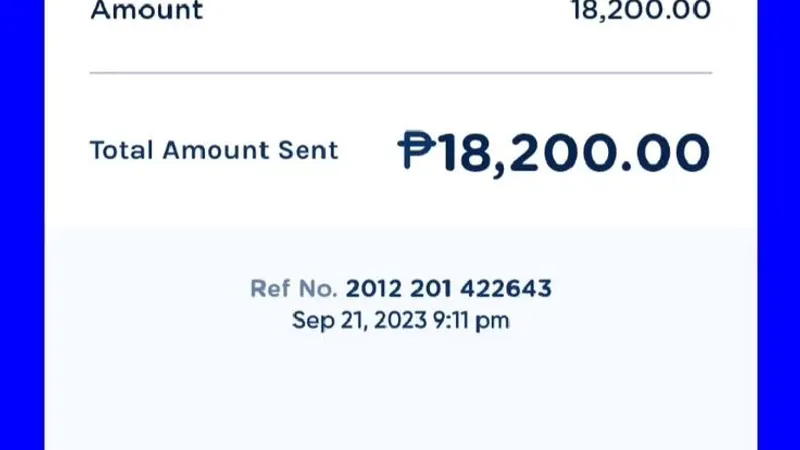
- Review the details carefully, ensure you have sufficient wallet balance, and tap Pay ₱XXX.XX.
- Immediately capture a screenshot of the completed GCash transaction confirmation showing the 13-digit Reference Number.
Step 5: Verify Your Updated 8K8 Account Balance
- Return to your 8K8 browser or app window.
- Refresh your account balance or return to the main gaming lobby.
- Your newly deposited funds will appear in your playable wallet within 30 to 60 seconds.
Direct QR Scanning vs. Manual Express Send: Critical Safety Difference
Understanding the technical difference between gateway methods is vital when mastering how to cash in 8k8 using gcash:
- Automated Gateway QR (Recommended): The system generates a single-use, dynamic QR code linked directly to your transaction session ticket. The moment GCash processes the payment, the API webhook automatically confirms the transfer and credits your player balance without human intervention.
- Manual Express Send (High Risk): Never send funds directly to phone numbers posted in chat rooms, social media groups, or unverified messages claiming to be 8K8 agents. Manual transfers lack automated tracking, frequently lead to delayed or lost credits, and are susceptible to impersonation scams.
Troubleshooting Delayed or Floating GCash Deposits
If you followed the instructions on how to cash in 8k8 using gcash but your playable balance has not updated within 5 minutes, consult this troubleshooting matrix:
| Deposit Issue | Primary Root Cause | Step-by-Step Resolution |
|---|---|---|
| Payment Deducted but Not Credited | Sent wrong decimal amount or QR code expired before confirmation. | Locate your GCash transaction receipt, copy the 13-digit Reference Number, and contact 8K8 Live Chat. |
| "Payment Gateway Timeout" | Intermittent maintenance on the third-party payment aggregator. | Do not resubmit payment immediately. Wait 3 minutes, check if funds were deducted from GCash, then refresh the casino app. |
| "Exceeded GCash Wallet Limit" | Reached monthly inbound/outbound wallet cap (₱100k for Basic, ₱500k for Fully Verified). | Verify your GCash account status in the GCash app, or switch your deposit channel to PayMaya. |
| Incorrect Reference Number Submitted | Manual entry error when typing transaction details into cashier. | Send an uncropped screenshot of the official GCash SMS/app receipt to customer support for manual matching. |
Golden Rules for Seamless GCash Deposits
- Always Match Real Names: Ensure your GCash account's verified legal name matches the name registered on your 8K8 account profile. Discrepancies may cause automated fraud-prevention flags.
- Never Reuse Old QR Codes: Every single deposit ticket generates a fresh, unique QR code. Sending money to an expired or previously used QR code will cause floating funds that require manual accounting retrieval.
- Respect Exact Decimals: If the cashier prompts you to pay
₱500.45, pay that exact amount down to the centavo. The decimal is the system's unique identifier for your session. - Maintain Storage for Receipts: Keep transaction screenshots until your funds have been successfully wagered or withdrawn.
Alternative Deposit Channel: PayMaya (Maya)
If GCash experiences scheduled system maintenance or network downtimes (commonly occurring during midnight system updates), you can utilize PayMaya as an immediate alternative:
- In the 8K8 deposit cashier, select Maya or PayMaya QR.
- Enter your deposit sum and generate the Maya merchant QR.
- Open the Maya app, scan the code, and confirm authorization.
- Funds credit instantaneously with the same 0% fee structure.
Frequently Asked Questions About Cashing In on 8K8
What is the minimum amount when learning how to cash in 8k8 using gcash?
The standard minimum deposit across most GCash channels on 8K8 is ₱100.00 PHP, although specific promotional bonuses may require a minimum cash-in of ₱200.00 PHP.
Does 8K8 charge transaction fees for GCash deposits?
No. 8K8 does not deduct any transaction fees for processing GCash deposits. If you deposit ₱500.00, your playable balance receives the full ₱500.00.
How long do GCash deposits typically take to reflect?
Under normal network conditions, GCash deposits credit automatically within 10 to 60 seconds following payment authorization in your GCash application.
What should I do if I scanned an expired QR code?
If funds were deducted from your GCash wallet on an expired code, contact 8K8 24/7 customer support immediately. Present your GCash Reference Number, timestamp, and screenshot for manual balance crediting.