

Logging into your player account should be quick, predictable, and secure. When you attempt an 8k8 login, entering the correct credentials on the verified portal ensures immediate access to your gaming balance and active bonuses. However, routine connectivity glitches, forgotten security passwords, or incorrect domain mirrors can lock you out of the platform unexpectedly.
This technical guide provides step-by-step instructions for executing a clean 8k8 login, resolving common authorization error codes, restoring lost passwords through SMS verification, and identifying authenticated login domains across mobile and desktop devices.
Technical Specifications: 8K8 Authentication Portal
| Feature | Specification / Requirement |
|---|---|
| Supported Browsers | Google Chrome (v100+), Safari (v15+), Mozilla Firefox, Edge |
| Mobile Platforms | Android (APK & Mobile Web), iOS (Safari PWA Web Clip) |
| Authentication Factors | Username / Registered Phone Number + Password |
| Security Layer | Cloudflare DDoS Protection + 256-bit TLS Encryption |
| Recovery Channels | Registered Philippine Mobile Number (SMS OTP) & 24/7 Live Support |
| Session Timeout | 15–30 minutes of inactivity (Automatic Logout) |
Step-by-Step 8K8 Login Procedures
Executing your 8k8 login requires navigating directly to the verified entrance. Following the standard procedure prevents credential exposure and session timeouts.
1. Web Browser Login (Mobile & Desktop)
- Launch your preferred browser and navigate to the official domain (8k8bet.ph).
- Locate the golden Login button in the upper-right corner of the interface.
- Type your registered username or linked Philippine mobile number in the upper field.
- Input your account password accurately, paying close attention to case sensitivity.
- If prompted, solve the visual sliding puzzle or enter the 4-digit captcha verification code.
- Click Confirm Login to enter your player lobby.
2. Mobile App Login (Android APK & iOS Shortcut)
- Open the 8K8 application from your device home screen.
- Tap the 8k8 login button situated on the main launch screen.
- Input your saved credentials. You may enable biometric recognition (Fingerprint/Face Unlock) if your mobile OS supports saved browser credentials.
- Confirm your submission to access the mobile gaming suite directly.
Troubleshooting Common 8K8 Login Errors
When an 8k8 login attempt fails, the system returns specific feedback. Use the diagnostic reference table below to identify the root cause and execute the correct fix.
| Error Message / Symptom | Probable Cause | Immediate Remediation Step |
|---|---|---|
| "Incorrect Username or Password" | Typographical error or incorrect letter case in password field. | Verify Caps Lock is disabled. Retype password manually rather than auto-filling. |
| "Account Locked / Too Many Attempts" | Exceeded 5 consecutive failed login attempts within 10 minutes. | Wait 15 minutes for the temporary lock to expire, or use the SMS password reset feature. |
| "Network Anomaly / Request Timeout" | Unstable local mobile data connection or ISP DNS routing delay. | Switch between Wi-Fi and mobile data (Smart/Globe), or refresh your network connection. |
| "Verification Code Expired" | Delay in submitting the visual captcha or SMS OTP code. | Click the captcha image to refresh a new code and submit within 60 seconds. |
| "IP Restricted / Region Blocked" | Active VPN connection routing your IP address outside the Philippines. | Disable third-party VPNs or proxy tools, then relaunch the official portal. |
How to Recover a Forgotten 8K8 Login Password
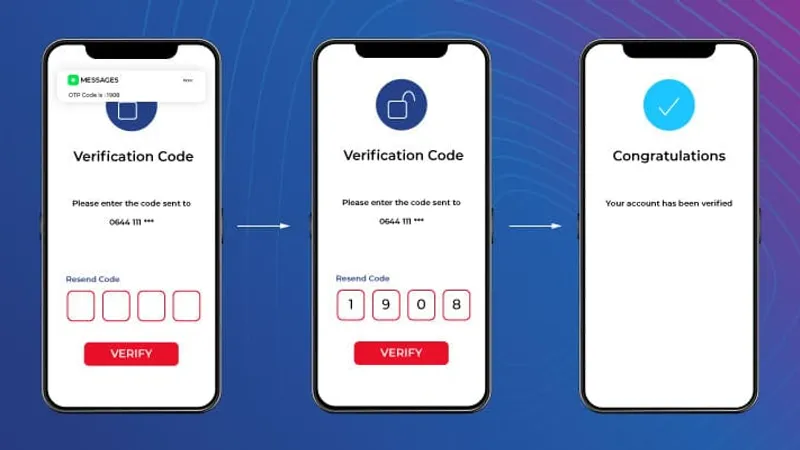
If you cannot recall your security credentials, do not continue guessing. Repeated failed attempts will trigger an automated account security freeze. Follow this verified recovery procedure to regain access:
- Click on the Forgot Password? link located directly below the 8k8 login submission fields.
- Enter your registered Philippine mobile number (format:
09XXXXXXXXX). - Tap Send OTP to generate a one-time numerical code via SMS.
- Check your mobile messaging inbox for the 6-digit verification code. The code remains valid for 5 minutes.
- Enter the SMS code into the verification field on the recovery screen.
- Create a new strong password containing 8–16 characters with at least one uppercase letter and one number.
- Confirm the change, then return to the main portal to execute a fresh 8k8 login.
Note: If you have changed your phone number or do not receive the SMS code after two attempts, contact the 24/7 customer service chat and prepare your registered real name and recent GCash deposit transaction receipt for manual identity verification.
Identifying Legitimate 8K8 Login Portals vs. Phishing Scams
Because of 8K8's popularity in the Philippine iGaming space, rogue operators frequently deploy copycat mirror sites designed to steal player logins and account funds. Protecting your account begins with domain verification.
PHISHING SAFETY AUDIT
├── 1. Inspect SSL Certificate: Look for the valid lock icon (HTTPS) in your browser address bar.
├── 2. Verify Domain Structure: Legitimate portals use clean sub-routes without excessive dashes or numbers.
├── 3. Beware of Unsolicited Messages: 8K8 will never send SMS or Telegram messages requesting your password.
└── 4. Inspect Page Rendering: Fake phishing pages often have broken image links and non-functional footer buttons.
Essential Security Rules for Your Account
- Never Share One-Time Passwords: Platform staff will never ask for your SMS verification code under any circumstances.
- Avoid Public Wi-Fi Networks: Refrain from performing an 8k8 login on open, unsecured public networks without cellular encryption.
- Maintain Dedicated Gaming Credentials: Avoid reusing passwords that you employ for your primary personal email or banking portals.
Frequently Asked Questions About 8K8 Login
Why does my 8k8 login keep failing even with the correct password?
Your browser cache or stored cookies may be transmitting outdated session tokens. Clear your browser cache and cookies, restart the browser, and attempt the login again.
Can I stay permanently logged in on my mobile device?
While the 8K8 mobile app retains your active session during regular daily use, the platform enforces an automatic logout after prolonged inactivity to safeguard your account funds.
What should I do if my account is locked due to too many failed login attempts?
Wait 15 minutes for the system's security cooldown to reset. If the lockout persists, use the "Forgot Password" link or contact the official live chat agent with your registered mobile number.
Can I access my 8K8 account from multiple devices simultaneously?
No. Logging into your account from a second device will automatically terminate the active session on your previous device to prevent unauthorized concurrent betting.