

Playing your favorite casino games through a native mobile application delivers faster loading times, enhanced graphics performance, and one-tap biometric access compared to standard mobile web browsers. When executing an 8k8 app download, obtaining the verified application directly from official channels ensures your smartphone remains secure from corrupted third-party files.
This comprehensive technical walkthrough explains how to complete your 8k8 app download for Android devices, configure necessary system permissions, set up the official web shortcut for iOS devices, and claim the dedicated mobile installation bonus reward.
Technical Specifications: 8K8 Mobile Client
| Feature / Attribute | Android Specification | iOS Specification |
|---|---|---|
| Package Format | Standalone APK (.apk) |
Progressive Web App (PWA Web Clip) |
| Minimum OS Version | Android 7.0 (Nougat) or newer | iOS 13.0 or newer |
| Recommended Storage | 80 MB free disk space | Negligible (Cloud-streamed cache) |
| RAM Requirement | 3 GB RAM minimum (4 GB recommended) | 3 GB RAM minimum |
| Connectivity | 4G LTE, 5G, or Stable Wi-Fi | 4G LTE, 5G, or Stable Wi-Fi |
| Biometric Support | Fingerprint & Face Unlock | Touch ID & Face ID |
| App Download Bonus | ₱38–₱88 Free Bonus Credit | ₱38–₱88 Free Bonus Credit |
Step-by-Step 8K8 App Download for Android (Official APK)
Due to Google Play Store restrictions regarding real-money online casino applications in specific territories, the official Android client is distributed as a direct APK download. Follow this sequence to install the application safely:
ANDROID INSTALLATION LIFECYCLE
[1. Official Download] ──> [2. Enable Permission] ──> [3. Package Installer] ──> [4. Launch & Bind]
 Download official APK      Allow "Install from       Run APK installer and       Log in and verify
 from verified portal       Unknown Sources"          grant basic permissions     e-wallet profile
1. Download the Installation Package
- Launch your mobile web browser (Google Chrome is recommended) on your Android device.
- Visit the official portal (8k8bet.ph) and locate the App Download tab on the navigation bar.
- Tap the Android Download button to initiate the 8k8 app download process.
- Your browser may display a prompt stating: "File might be harmful. Do you want to download 8K8.apk anyway?" This is a standard Android operating system warning for files downloaded outside the Play Store. Tap Download anyway.
2. Configure System Installation Permissions
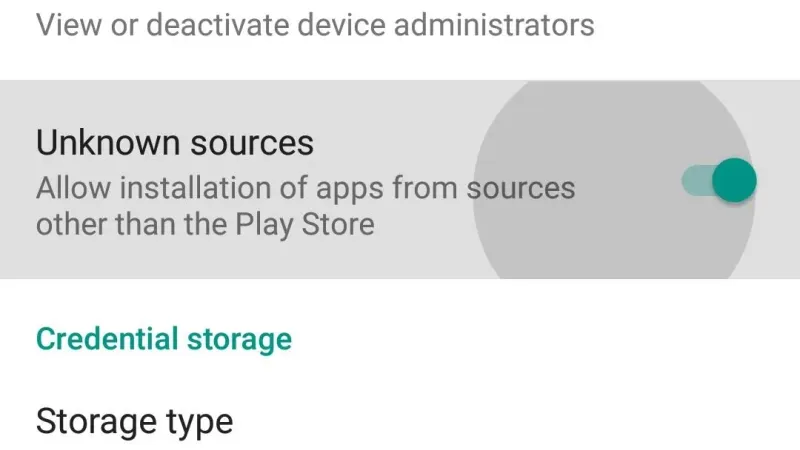
- Once the download finishes, tap Open from your notification shade or navigate to your device's Downloads folder.
- If your device blocks the installation, open your Android Settings > Security & Privacy > Install Unknown Apps.
- Select your web browser (e.g., Chrome) and toggle the switch to Allow from this source.
3. Finalize Installation and Launch
- Return to the downloaded package and tap Install.
- Allow your device's built-in security scanner (e.g., Xiaomi MIUI Security, Samsung Knox) to verify package integrity.
- Tap Open to launch the newly installed app, or access it from your device home screen.
Setting Up 8K8 on Apple iOS (iPhone & iPad)
Apple's App Store restricts real-money gaming APK files. However, 8K8 provides an optimized Progressive Web Application (PWA) that operates identically to a native iOS application without requiring third-party sideloading tools.
Step-by-Step iOS Safari Web Clip Setup
- Open the native Safari browser on your iPhone or iPad (do not use Chrome or Firefox for this setup).
- Navigate to the verified portal (8k8bet.ph).
- Tap the Share button (the square icon featuring an upward arrow) located at the bottom center of the Safari browser interface.
- Scroll down through the options menu and select Add to Home Screen.
- Rename the bookmark shortcut to 8K8 Casino and tap Add in the upper-right corner.
- The official 8K8 app icon will now appear on your iPhone home screen. Tapping this icon launches full-screen gaming with optimized caching and zero browser URL clutter.
How to Claim the 8K8 App Download Bonus
8K8 rewards members who install the mobile client with an exclusive download bonus ranging between ₱38 and ₱88. Follow this procedure to ensure the bonus reflects in your balance:
- Complete your 8k8 app download and open the application.
- Complete your 8k8 login or 8k8 register within the mobile application.
- Go to Member Center > Account Security and verify your Philippine mobile number via SMS OTP.
- Bind your verified GCash or Maya e-wallet account details.
- Navigate to the Promotion Center, locate the App Download Reward, and tap Claim.
- The bonus funds are typically credited within 10 to 30 minutes following automated account verification.
Troubleshooting Common 8K8 App Download & Installation Errors
If you experience interruptions while performing an 8k8 app download or installing the package, review the diagnostic solutions below:
| Installation Error | Root Cause | Technical Resolution |
|---|---|---|
| "App Not Installed" | Insufficient device storage or corrupted package download. | Free up at least 300 MB of internal storage space, delete the old file, and restart the download. |
| "Parse Error: Problem Parsing Package" | Incompatible Android OS version or incomplete file download. | Verify your device runs Android 7.0 or higher. Download the APK file using a stable Wi-Fi connection. |
| "Blocked by Play Protect" | Google Play Protect flagging unlisted developer signature. | Open Google Play Store > Settings > Play Protect > tap gear icon > temporarily disable "Scan apps with Play Protect". |
| "Download Fails at 99%" | ISP network throttling or packet loss during cellular transfer. | Clear your browser's download manager cache, disable battery saver mode, and restart the download. |
| "App Crashes on Launch" | Outdated WebView component or low remaining system RAM. | Update Android System WebView via the Google Play Store and close background applications before launching. |
Security Audit: Avoiding Cloned & Malicious APK Packages
Because players actively seek an 8k8 app download, fraudulent actors occasionally distribute modified APK files laced with adware, keyloggers, or unauthorized payment redirect scripts.
How to Verify a Safe 8K8 APK
- Inspect the Download Origin: Only initiate an 8k8 app download directly from the official domain (8k8bet.ph). Never download packages from unknown Telegram channels, Facebook groups, or file-hosting blogs.
- Review Required Permissions: The official 8K8 app requires basic internet and storage access. It will never request access to your SMS inbox, contacts list, microphone, or accessibility services.
- Keep the App Updated: Periodically check the in-app announcement center to install newer versions featuring upgraded security patches and game compatibility updates.
Frequently Asked Questions About 8K8 App Download
Is the 8k8 app download completely free?
Yes. Performing an 8k8 app download and installing the client is completely free of charge. You only deposit funds when you choose to play real-money games.
Why is the 8K8 app unavailable directly on the Google Play Store?
Google restricts real-money casino applications from direct listing in several regions. The standalone APK is the industry standard for delivering secure, uninterrupted access directly to players.
Does the 8K8 mobile app consume more data than the browser version?
No. In fact, the application stores static game assets, UI graphics, and sound libraries directly on your device, which reduces ongoing mobile data consumption during long gaming sessions.
Can I update the 8K8 app automatically?
When a critical software update is released, the app will prompt you with an in-app notification upon launch. Tap "Update Now" to download and install the latest patch seamlessly.